
RUN STATE
Queued
The request has a saved cap and a wallet reservation. A worker has not claimed it yet.
Check: Is the tool enabled and is the cap affordable?
Training / Tool runs
A useful result needs a defined input, a cost ceiling, a source receipt, and a clear outcome. This field guide follows that path and shows what to check when it stops.
Instructional example · no live vendor data or customer charge
Lesson 01 / Availability
Start with the label beside a tool. The public directory is a map of researched possibilities. The current private preview also has four synthetic fixtures. A reviewed live tool needs its own enabled adapter, current price, permitted use, and metered receipt before a customer can run it.
| Label | What you see | Live data? | Credits? |
|---|---|---|---|
| Research only | A candidate capability and source notes | No | No run |
| Synthetic demo | An invented result shape for learning | No | Zero |
| Reviewed live | A source-backed, metered provider result after release | Only when enabled | Shown before a run |
No reviewed live vendor tool is enabled in this preview. A synthetic response cannot support a real business decision.
Lesson 02 / State and evidence
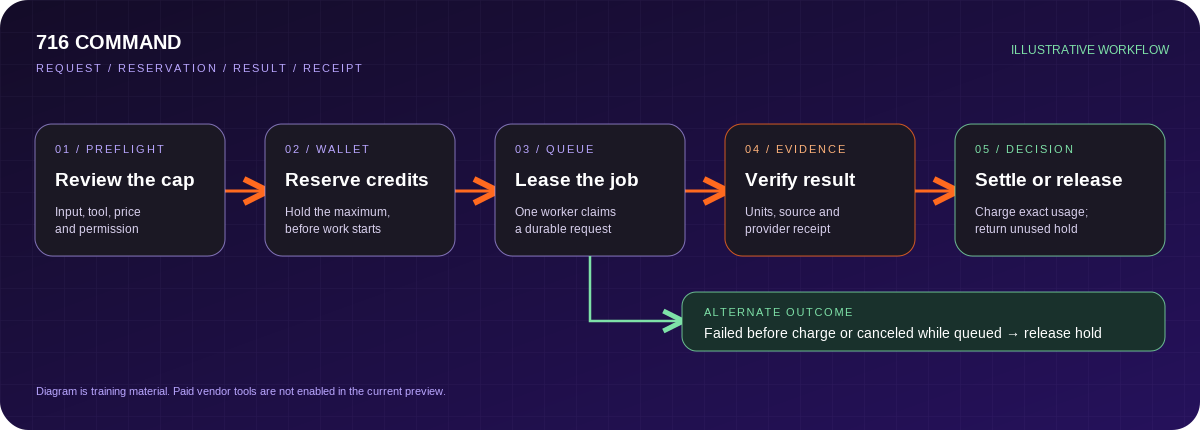
For a reviewed live run, the request records its workspace, input identity, selected tool, cap, and price snapshot before work is queued. A worker leases the queued job. A result becomes final only after the system has checked the provider's units and receipt against the saved cap.
The request has a saved cap and a wallet reservation. A worker has not claimed it yet.
Check: Is the tool enabled and is the cap affordable?
A worker has a lease. The request still has a spending ceiling and an idempotency identity.
Check: Which provider receipt will prove the units used?
A verified result and charge are recorded. Any unused reservation is released.
Check: Do result, units, and wallet debit agree?
No successful result was delivered. The run records an error and releases its reservation under the failure path.
Check: Was any external charge ambiguous or held for review?
A queued request was canceled before a worker claimed it, and its reservation was released.
Check: Was cancellation confirmed before the lease?
Succeeded, failed, and aborted are different terminal outcomes. An in-flight job may need operator review if its provider cost or delivery is uncertain; do not infer a charge from a status label alone.
Lesson 03 / Worked example
Imagine a wallet with 250 credits. A planned run reserves up to 40, leaving 210 available while it waits. If verified usage is 28, the wallet settles 28 and releases the unused 12. The final balance is 222. These invented amounts are not a price quote for any provider.
| Moment | Balance | Reserved | Available |
|---|---|---|---|
| Before request | 250 | 0 | 250 |
| Queued with cap | 250 | 40 | 210 |
| Success at 28 | 222 | 0 | 222 |
Available = balance − reserved. If the job fails before a charge is earned, its reservation is released and the example wallet returns to 250 available credits. A queued cancellation does the same only when confirmed before a worker lease.
Lesson 04 / Decision quality